
How to Identify Productivity Blockers (And Fix Them Fast)

Why You’re Working Hard But Getting Nowhere
You’re busy. Constantly moving. Emails, meetings, tasks. Yet at 5pm, you look back and struggle to name one meaningful thing you accomplished.
It’s not laziness. It’s friction — and knowing how to identify productivity blockers in your own workday is the first step to fixing them.
Productivity friction is the invisible resistance that drains your energy without producing results. It’s the colleague who always needs “just five minutes.” The system that requires three logins. The approval process that takes days for a decision that should take minutes.
Most productivity advice tells you to work harder or use better tools. But if you’re swimming against a current, technique doesn’t matter. You need to identify what’s creating the resistance.
That’s where friction logging comes in — a simple method borrowed from product design that helps you spot exactly what’s slowing you down.
What Is Friction Logging?
Friction logging is the systematic practice of recording every obstacle, delay, or annoyance you encounter whilst completing your work.
Think of it as keeping a detective’s notebook for your productivity. Every time something slows you down — even slightly — you write it down.
The premise is simple: You can’t fix what you can’t see. Most productivity blockers operate beneath conscious awareness. You adapt, work around them, and never question whether they should exist.
Friction logging forces visibility. Once documented, patterns emerge. The same roadblocks appear repeatedly. Suddenly, what felt like “just how things are” becomes a solvable problem.
Why Friction Logging Works
Traditional productivity methods assume you know what’s blocking you. They prescribe solutions: time blocking, better tools, morning routines.
But what if the real problem is the approval process that requires five signatures? Or the meeting culture that interrupts deep work every 90 minutes?
Friction logging starts with diagnosis, not prescription. It reveals your actual blockers, not theoretical ones.
Research backs up how significant these blockers can be. A study by Gloria Mark at the University of California, Irvine found that it takes an average of 23 minutes to fully refocus after an interruption — and the average worker is interrupted every two to three minutes. That’s not a time management problem. That’s a friction problem. You might struggle with time blocking not because you’re bad at planning, but because constant interruptions make any schedule impossible.
Friction logging identifies the real enemy.
How to Identify Productivity Blockers: The Three Types
Before you can fix your productivity blockers, you need to recognise what category they fall into. Not all friction is equal — and understanding the type helps you choose the right solution.
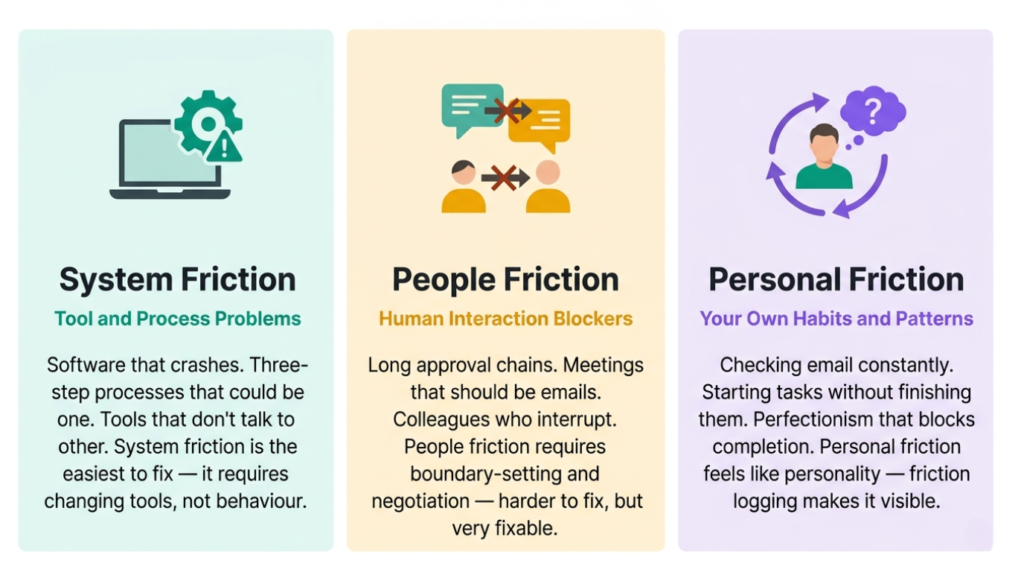
System friction is usually easiest — it requires changing tools or processes, not behaviour. People friction takes longer because it involves negotiating with others. Personal friction is often the hardest to spot because it feels like personality rather than a fixable problem. Friction logging makes all three visible.
QUICK WIN:
Right now, think about the last time you felt frustrated at work. Was it a tool, a person, or your own habits? Label it — system, people, or personal. Just naming the type of friction you face is the first step to fixing it.
How to Identify Productivity Blockers Step by Step
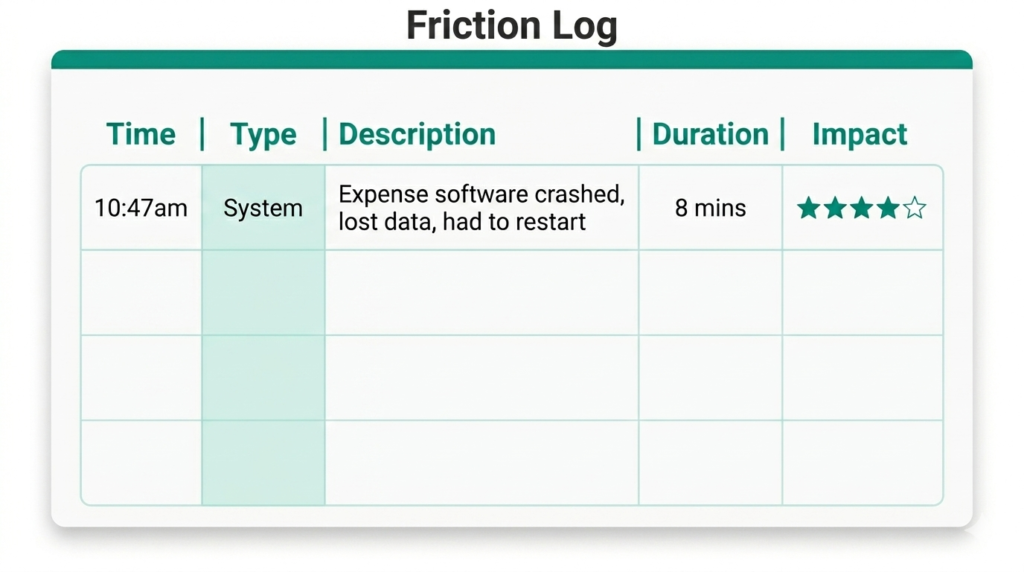
Before you begin logging, you need to decide how you’ll capture friction in the moment. The method matters less than the consistency — what works is whatever you’ll actually use. A small notebook on your desk works well for those who think better on paper. A pinned note in your phone’s notes app suits people who are rarely without their phone. A simple Word or Google Doc open in a browser tab works if you’re desk-based. Some people prefer a voice memo app for hands-free capture. Whatever you choose, keep it open and within reach throughout your working day. For a ready-made frcition log, download our Excel friction log template, which also analyses your entries and helps you to plan productivity improvements. The template below shows what a completed friction log entry looks like in practice.
Step 1: Choose Your Focus Area
Don’t try to log everything at once. Pick one specific area where you suspect friction exists.
Good starting points include your morning routine until you start deep work, a specific project that feels harder than it should be, one day per week to capture typical friction, or a recurring task that always takes longer than expected. The more focused your scope, the clearer your insights will be.
Easy: Log one specific task — choose something you do regularly and log friction only during that activity.
Medium: Log one full workday — track every friction point from 9am to 5pm for a comprehensive view of daily blockers.
Advanced: Log for one week — patterns become crystal clear across multiple days, showing recurring issues versus one-off problems.
Step 2: Capture Friction in Real-Time
This is crucial: log friction as it happens, not at the end of the day.
Memory is unreliable. The two-minute delay waiting for software to load feels insignificant in retrospect. But if it happens twelve times daily, that’s 24 minutes of pure waste. Your logging system should be frictionless itself. Whatever lets you capture friction within 5 seconds — a notebook, a note-taking app, a voice memo — will work. If logging itself becomes a barrier, you’ll stop doing it.
What to record for each friction point:
Time: When did it occur?
Type: System, people, or personal?
Description: What happened?
Duration: How long did it delay you?
Emotional impact: Annoying? Frustrating? Enraging?
Example entry: “10:47am — System — Expense software crashed mid-entry, lost all data, had to restart — 8 minutes — Very frustrating.”
Step 3: Review and Identify Patterns
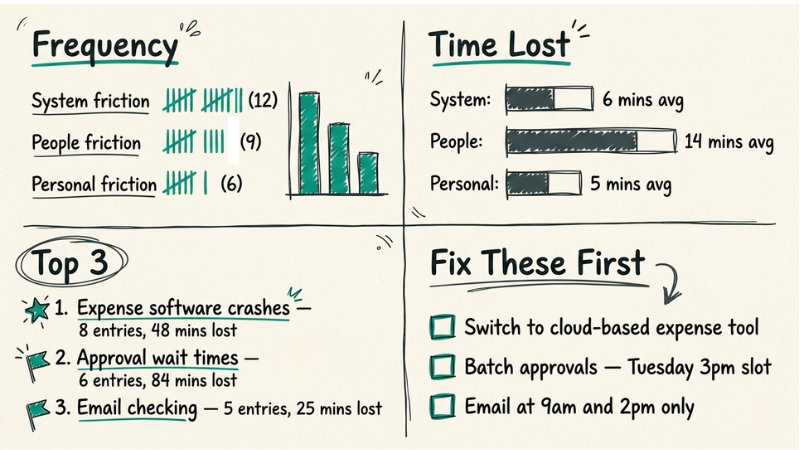
After your logging period, review your entries carefully. Don’t just skim — analyse. Look for frequency (what appears repeatedly?), impact (which friction points cost the most time?), fixability (which are within your control?), and clusters (do multiple friction points share a common cause?).
Often, what looks like ten different productivity blockers is actually one root cause manifesting in various ways. You might log interruptions from colleagues, difficulty finding files, and confusion about priorities. The root cause? Lack of clarity about what you’re working on and when you’re available.
Similar to how the 1-3-5 rule forces you to prioritise daily tasks, friction logging forces you to prioritise what’s actually blocking your productivity.
Step 4: Eliminate, Automate, or Adapt
Now comes action. For each significant productivity blocker, choose one of three approaches.
Eliminate: Can you remove this entirely? Many processes exist simply because “we’ve always done it this way.” Question everything. If eliminating isn’t possible, can you at least reduce frequency?
Automate: Can technology handle this? If you’re manually copying data between systems, that’s a clear automation candidate. If you’re typing the same email responses, create templates.
Adapt: If you can’t eliminate or automate, can you work around it? Schedule deep work when interruptions are least likely. Batch communications into scheduled blocks rather than scattering them throughout the day.
Start with your highest-impact friction points. You don’t need to fix everything — just the things causing the most damage. For a more structured approach to doing this, use the GROW coaching model framework to think through the most effective ways to eliminate friction.
QUICK WIN:
Open a notes app right now and keep it open for the rest of today. Every time something slows you down — however minor — write one sentence about it. At the end of the day, count how many entries you have. That number alone will tell you something important about your hidden productivity blockers.
Common Productivity Blockers You’ll Probably Discover
Based on common friction log patterns, these are the blockers that emerge most consistently.
The Meeting Culture Problem
Meetings scattered throughout the day prevent deep work. Each one requires context-switching time before and after. You spend more time preparing for and recovering from meetings than in actual focused work.
Solution: Batch meetings into specific days or times. Protect certain days as meeting-free. Decline meetings without clear agendas.
The Notification Avalanche
Email, Slack, Teams, text messages — constant pinging fragments attention. Research published in PMC’s work interruption study found that information workers spend on average more than two hours daily dealing with interruptions. Each notification creates a micro-interruption, even if you don’t respond.
Solution: Batch communications into scheduled blocks. Turn off all non-essential notifications. Set clear “available” and “unavailable” hours.
The Tool Complexity Trap
Too many tools, none talking to each other. Data lives in six places. Finding information takes longer than using it.
Solution: Consolidate tools. Accept “good enough” with integration over “perfect” without it. Document where things live.
The Unclear Priorities Problem
When everything feels urgent, nothing is. You spend mental energy repeatedly deciding what to work on rather than actually working.
Solution: Establish clear prioritisation criteria. Use frameworks to make decisions once rather than repeatedly. Protect time for your true priorities.
The Perfectionism Pattern
Tasks expand to fill available time. You refine endlessly when “good enough” would suffice. The last 10% of polish takes 50% of the time.
Solution: Define “done” before starting. Set time limits. Recognise when diminishing returns kick in.
What Identifying Productivity Blockers Reveals That Other Methods Don’t
Most productivity systems tell you what to do: organise better, focus harder, plan more carefully.
Friction logging shows you what not to do — or more accurately, what’s stopping you from doing anything effectively.
It’s the difference between treating symptoms and diagnosing disease. You might spend months perfecting your mental performance strategies whilst ignoring that your workspace interruptions make focus impossible.
Learning how to identify productivity blockers systematically reveals hidden time sinks (the five-minute tasks that actually take thirty), energy drains (tasks that exhaust you disproportionately to their importance), false urgency (“fires” you put out that wouldn’t exist with better systems), and capacity limits (where you’re genuinely at maximum versus where friction creates artificial limits).
Perhaps most valuably, this process shows you where productivity advice conflicts with your reality. If every expert says “work in 90-minute blocks” but your friction log shows interruptions every 20 minutes, you need to fix the interruptions, not beat yourself up for failing to focus.
QUICK WIN:
QUICK WIN: Download our free Friction Log in the next section and keep it open tomorrow. Every time something slows you down — even briefly — log it. One sentence per entry. At the end of the day you’ll have your first real data on what’s actually blocking you.
Your Next Steps
Knowing how to identify productivity blockers works because it’s specific to you. Generic productivity advice fails because it ignores your context. Friction logging starts with your context.
This week, try this: tomorrow, pick one recurring task that frustrates you. Use our free Friction Log to capture every friction point you encounter whilst doing it. Just for that one task.
At the end, review your notes. You’ll probably find three to five specific blockers. At least one will be easily fixable. Fix that one thing. Repeat the task in a few days. Notice the difference.
That’s friction logging. Simple, specific, powerful. The goal isn’t perfect productivity — that doesn’t exist. The goal is reducing unnecessary resistance so your effort produces proportional results.
You’re already working hard. Friction logging ensures that work actually goes somewhere.
RESOURCES:
I only recommend resources that I either use personally or have researched and feel are genuinely helpful for my readers. Resources sometimes contain affiliate links; if you purchase through these, I may earn a small commission at no extra cost to you.
Recommended Reading
Deep Work by Cal Newport — The definitive case for eliminating shallow distractions and protecting focused work time. Essential reading once you’ve identified your friction points. Paperback
Indistractable by Nir Eyal — A practical guide to managing internal and external triggers that create friction and steal focus. Paperback
Related Articles from the Marginal Gains Blog:
Why Time Blocking Fails — Understanding why friction makes planning difficult
How to Batch Emails — Tackling one of the most common notification blockers
The 1-3-5 Rule — A prioritisation framework to use alongside friction logging
How to Improve Mental Performance — Building the cognitive capacity to do your best work
I'm Simon Shaw, a Chartered Occupational Psychologist with over 20 years of experience in workplace psychology, learning and development, coaching, and teaching. I write about applying psychological research to everyday challenges - from habits and productivity to memory and mental performance. The articles on this blog draw from established research in psychology and behavioural science, taking a marginal gains approach to help you make small, evidence-based changes that compound over time, allowing you to make meaningful progress in the areas you care about most.